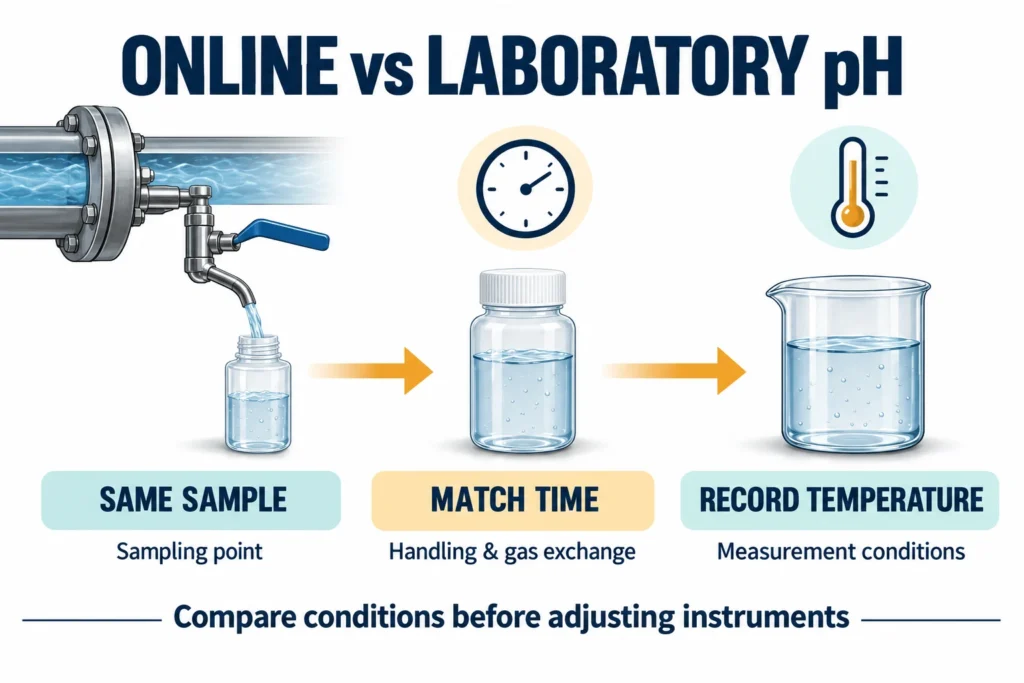
Why is an online pH reading different from lab results? The two instruments may be measuring different conditions. A grab sample can cool, exchange gases or change during transport. Sampling location, process timing and electrode condition also matter. Compare a fresh, representative sample at a documented temperature before adjusting either instrument.
For wastewater engineers and maintenance teams, a disagreement is a reason to check the comparison method first. A laboratory pH meter is not automatically right because it is in a laboratory. An online pH sensor is not automatically wrong because it sees a changing process.
This guide explains how to plan a useful comparison, record the evidence and decide what to investigate next.
What is different about online and laboratory pH measurement?
An online instrument follows the liquid at its installed measurement point. A laboratory instrument measures a collected portion of that liquid, usually later and in another container. Those results answer the same question only when the sample and measurement conditions remain comparable.
| Comparison factor | Online measurement | Laboratory measurement | Record before comparing |
|---|---|---|---|
| Location | Installed pipe, tank or bypass | Collected sample | Exact sampling point |
| Time | Continuous reading or logged trend | Reading after collection | Collection and test times |
| Temperature | Process or bypass temperature | Temperature during analysis | Both temperatures |
| Gas exposure | Process-dependent | May change during handling | Container and exposure |
| Sensor system | Process electrode and transmitter | Laboratory electrode and meter | Instrument and electrode IDs |
| Signal path | Local display, PLC or historian | Meter display or report | Which values were compared |
Hamilton's explanation of online and laboratory pH differences identifies sample handling, mixing, transport changes and differences between sensor systems as possible causes. A mismatch alone does not establish a failed sensor.
Why can the same water give different pH readings?
Temperature changes the comparison
Temperature affects both electrode response and the liquid's chemical equilibria. Automatic temperature compensation, or ATC, addresses electrode response. It does not generally convert the true pH of every sample to its pH at 25°C.
During calibration, the chosen buffer group and its temperature-dependent values also matter. Check the buffer label and the meter settings. HORIBA's ATC technical note explains these distinctions.
Record the actual sample temperature. Two meters with ATC enabled can still disagree when one measures hot process water and the other measures a cooled sample. See Tenber's temperature compensation guide for pH and conductivity for the broader configuration checks.
The sample changes after collection
An open container can allow gas exchange. Mixing, contamination and time in transit can also change the collected liquid. The effect depends on the water chemistry; there is no universal correction for a sample carried to the laboratory.
Compare results promptly using a documented sampling method. Avoid unnecessary splashing and transfers. Where gas-sensitive chemistry or low conductivity makes an open beaker unsuitable, review a suitable closed-flow comparison arrangement with the responsible engineer.
For a closer look at CO₂ uptake, degassing and handling, read why water sample pH changes after collection.
Sampling point and timing do not match
A sample taken beside a chemical dosing point may differ from the mixed liquid around the online sensor. A bypass may introduce transport delay. A reading taken after a dosing cycle cannot simply be paired with a sample collected before it.
Review Tenber's industrial pH sensor installation guide when deciding whether the sensor and sampling point represent the same process condition.
Either measurement system needs attention
Fouling, a blocked reference junction or an aging electrode can affect the process sensor or the laboratory probe. Passing a buffer check does not prove that an electrode will behave correctly in every process liquid.
Yokogawa's pH troubleshooting guidance recommends checking both instruments and comparing the same sample under comparable temperature and pressure conditions. It also discusses reference-junction and electrical effects.
How to compare online pH with a laboratory pH meter
For an on-site check with a portable reference, use the online pH meter and handheld meter field verification guide.
Use the following worksheet as a starting point for a site procedure. Adapt it to the liquid, equipment and approved sampling method.
1. Define the comparison before taking a sample
Write down the purpose: commissioning, maintenance verification or investigation of a disagreement. Specify the measurement point, reference instrument and acceptance criterion before collecting results.
Decide whether you are comparing process-temperature pH or a laboratory result obtained under a defined method. Keep these purposes clear in the record. For compliance reporting, follow the applicable approved method and site requirements.
2. Record the existing readings before adjustment
Capture the online display, temperature and time. If the complaint concerns the PLC value, record it separately from the local display. Save the relevant trend around the sampling time.
Do not erase the starting evidence by immediately applying an offset. Record the instrument settings and recent calibration history first.
3. Check the laboratory reference
Identify the meter and electrode. Check their condition and verify them with suitable fresh buffers according to the current instructions. Record the observed values, buffer identity and temperature.
If verification fails, resolve that problem before treating the laboratory result as a reference. Use Tenber's industrial pH calibration guide for related process-loop checks; follow the actual laboratory meter's own procedure.
4. Collect and test a representative sample
Use the designated sampling point and a clean, suitable container. Document collection time, temperature, handling and the start of measurement. Account for the time needed to refresh a sample line.
For a rapidly changing process, coordinate the sample collection with the online trend record. A later screenshot of the display may describe a different portion of water.
5. Separate sample effects from instrument effects
Where equipment limits and the site procedure allow, compare both measurement systems in the same fresh sample under controlled conditions. Only remove an installed sensor after safe isolation and protection against unintended control action.
If the systems agree there but disagree in their normal locations, investigate sampling and installation conditions. If they remain different, investigate the measurement systems. This test narrows the next action; it does not identify a cause by itself.
6. Repeat the comparison and document the outcome
Repeat paired measurements under comparable conditions. Record each pair rather than selecting only the closest result. Include observations about stability, sample handling and process changes.
After corrective work, repeat the original comparison method. Keep the before-and-after records together so another operator can understand what changed.
What does the pattern of disagreement suggest?
| Observed pattern | Next investigation |
|---|---|
| Local display agrees with the reference, but PLC differs | Output scaling, mapping and receiving-system configuration |
| Both systems agree in one fresh sample but differ in service | Sampling point, process conditions, installation and delay |
| A sample reading changes while it stands | Temperature, exposure, handling and continuing chemistry |
| Either system fails buffer verification | Buffer condition, calibration procedure and electrode condition |
| A difference remains after controlled repeat checks | Reference-junction behavior, sensor suitability and measurement uncertainty |
These are investigation routes, not automatic diagnoses. Use the pH monitor troubleshooting guide when the evidence points to the installed measurement loop.
How much pH difference is acceptable?
There is no universal acceptable difference between online and laboratory pH readings. Set the criterion from the process decision, method, instrument performance, sampling variability and required measurement uncertainty.
For a comparison log, record the signed difference:
Difference = online pH − reference pH
For example, 7.30 minus 7.10 gives +0.20 pH. This arithmetic example is not a tolerance or a Tenber test result. Report the difference in pH units, together with both temperatures and timestamps. A single difference cannot establish which instrument is correct.
What should a comparison record include?
Use one row per paired test:
- Sample point and process operating state.
- Collection time and online trend timestamp.
- Online pH, temperature and display or signal source.
- Reference pH, temperature and measurement time.
- Instrument IDs, buffer checks and calibration status.
- Container, handling and any observed sample changes.
- Signed difference, acceptance criterion and next action.
This record makes a support request more useful than a message saying only that the two meters disagree.
Frequently asked questions
Should I adjust the online controller to match the lab?
Only after checking the reference, sample handling and comparison conditions. An offset can hide a sampling difference. Follow the controller's current instructions and record the reason for any adjustment.
Does ATC make hot and cold pH readings identical?
No. ATC compensates electrode response; the sample's actual pH can still change with temperature. Compare on a documented temperature basis.
Which reading should I trust?
Use the result supported by verified equipment and the appropriate sampling and measurement method. Neither the online location nor the laboratory label alone proves accuracy.
Need help reviewing an online pH measurement loop?
Send Tenber the liquid, sensor and controller models, sampling location, paired pH and temperature records, calibration history and a simple process sketch. Include the required PLC signals, quantity and destination if the request concerns a new system.
Contact Tenber for an application review. Confirm the selected equipment and configuration against current documentation before quotation.
Updated October 28, 2026. General comparison guidance; no site trial or product performance result is claimed.